You pay flat for Claude Code. Are you extracting your money's worth?
TokenTrack lives in your menu bar and shows, in real time, the API-equivalent cost of every token you burn — across Claude Code, OpenClaw, and OpenAI. Know if you're getting $200 or $2,000 out of that $200 plan. 100% local.
I was pulling ~$1,800/mo of API value out of a $200 plan — and couldn't see it. ccusage only told me when I remembered to run it. So I put the number in my menu bar.
macOS v0.6.6 · Windows / Linux v0.6.5 · free tier + 14-day Pro trial · no card
All downloads: macOS · Windows · Linux (AppImage) · Linux (.deb)
macOS: signed & notarized by Apple. Windows: the installer isn't code-signed yet, so SmartScreen will warn — click More info → Run anyway. Linux AppImage: chmod +x then run. On every platform TokenTrack only reads the usage logs already on your disk — your data never leaves your machine.
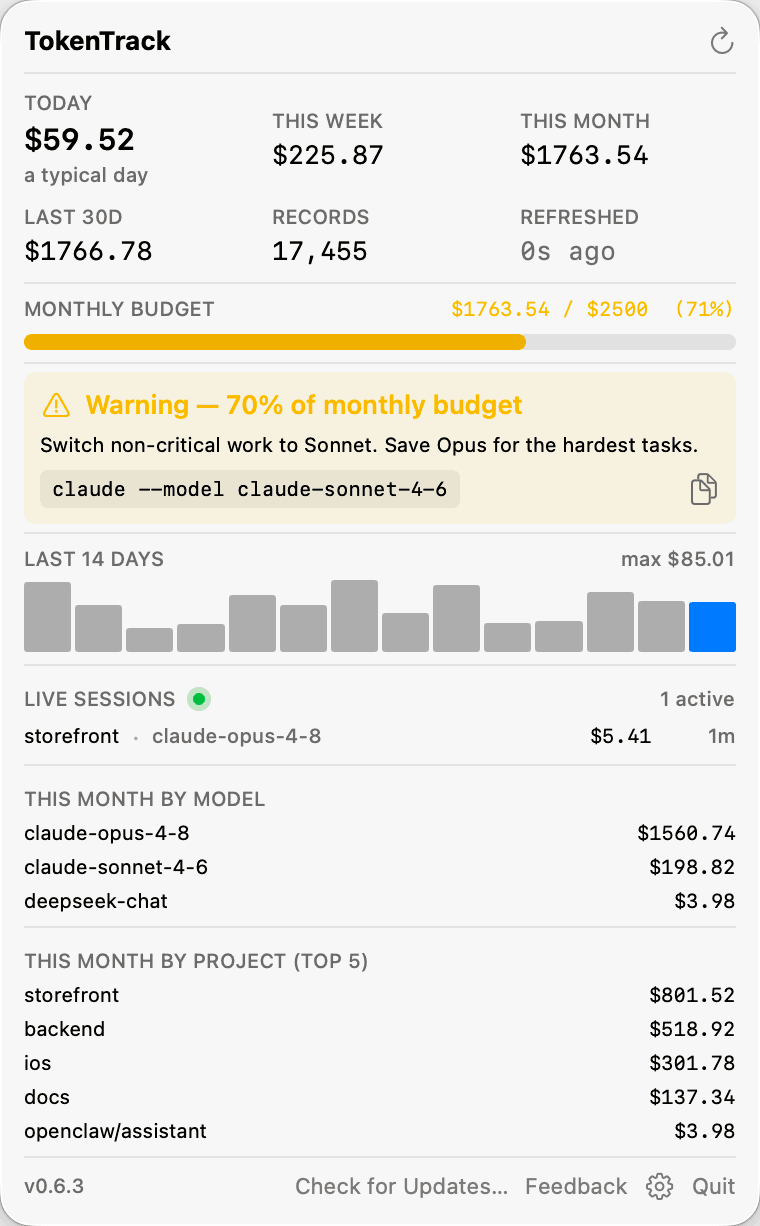
A free CLI tells you yesterday. TokenTrack tells you now.
ccusage is great — when you remember to run it. TokenTrack is the always-on, multi-provider, alert-driven layer on top of the same accurate numbers.
A CLI you run manually
- ✕ You have to remember to run a command to see anything
- ✕ One provider at a time — no combined view
- ✕ No alerts — you find out you blew past budget after the fact
- ✕ No budget cap — nothing warns you mid-month
TokenTrack, always on
- ✓ Live spend in your menu bar / tray, refreshed every 30–60s
- ✓ One screen across Claude Code, OpenClaw, and OpenAI
- ✓ 70 / 90 / 100% alerts + live remaining budget
- ✓ Accurate pricing — matches ccusage within ~3%, incl. 1-hour cache tiers
Built for people who live in Claude Code
Real-time value
Today / week / month / 30-day API-equivalent spend, broken down by model and project, always in your menu bar.
Budget alerts
Set a monthly cap. Get nudged at 70%, 90%, and 100% — before you hit a surprise, not after.
Every provider
Claude Code, OpenClaw and OpenAI in one number — including DeepSeek V4 (with peak/off-peak and China-holiday pricing), Kimi and GLM at their real rates. Add any model's rate yourself.
100% local
Your usage data never leaves your machine. No account required to track. Reads the logs already on your disk.
Accurate pricing
Handles message dedup and 1-hour vs 5-minute cache pricing — reconciled against ccusage.
Optional price sync
Off by default: sync the model price table from the LiteLLM registry, so models not yet in the built-in table get a real price instead of a Sonnet-rate estimate.
Free to start. Pay when you want it all.
Free forever: track any one source (Claude Code, OpenClaw, or OpenAI) with accurate per-model pricing. Pro adds all sources at once, budget alerts with live remaining budget, and auto price sync.
- ✓ Any 1 provider
- ✓ Accurate per-model pricing
- ✓ 14-day Pro trial included
- ✓ All providers & alerts
- ✓ Auto price sync
- ✓ Free updates while subscribed
- ✓ Everything, forever
- ✓ All future updates
- ✓ Cheaper than yearly within ~2.5 years
- ✓ All providers & alerts
- ✓ Auto price sync
- ✓ ~27% cheaper than monthly
Questions, answered
Is it a ccusage alternative?
Yes — the same accurate numbers (reconciled to within ~3%), but always-on in your menu bar, across every provider, with budget alerts. ccusage is a great CLI you run by hand; TokenTrack is the ambient layer on top.
Does my usage data leave my machine?
No. TokenTrack reads the logs already on your disk and computes everything locally — your usage data never leaves your machine. The app's own network calls are update checks, an optional price-table sync, and (for monthly/yearly licenses) a renewal check that sends only your license key. If you add an OpenAI key, it fetches your usage from OpenAI directly. Verify it yourself with Little Snitch or your firewall.
What's your refund policy?
30-day money-back on every plan, no questions asked — just email leoxundelai@gmail.com. Subscriptions can be cancelled any time the same way. Full details: gettokentrack.com/refund.
What happens to my lifetime license if you stop shipping?
It keeps working. It's a local app with an offline license — there's no server to switch off. Lifetime includes every future update while they exist.
Does it work on Windows and Linux?
Yes — a native menu-bar app on macOS and a system-tray app on Windows and Linux, with the same tracking, pricing, budget alerts and license. The switch-to-a-cheaper-model suggestion and the live-session view are macOS-only for now.
Stop guessing. Download it now.
Free tier, no card, no account. Upgrade whenever the number makes the case for you.
Not ready? Drop your email and I'll tell you when there's a reason to come back: